
Download Color Picker Metro – Color Picker, Screen Color, Extract Color, Digital Design, RGB, HEX, CMYK, HSL, HSB, Utility Tool, Color Extraction
Overview
Color Picker Metro is a utility application designed to assist digital artists, designers, and developers in accurately capturing and manipulating colors from their screens. The app streamlines the process of color extraction, enabling users to quickly identify and save specific hues for use in various creative and technical projects. By providing immediate access to precise color values, it addresses common workflow inefficiencies in digital media production, where manual color matching or estimation can lead to inconsistencies.
Targeted at professionals and enthusiasts working in graphic design, web development, and digital illustration, Color Picker Metro enhances precision and speed when selecting colors from visual content. Its ability to capture any visible color with a simple keyboard shortcut makes it a valuable tool in environments where color accuracy is critical. Real-world use cases include matching brand colors in design mockups, debugging color values in code, or replicating textures and gradients from reference images.
The developer, ColorPickerMetro, has positioned this app as a focused utility for Windows users seeking a lightweight yet powerful color extraction solution. While the developer’s background was not further detailed, the app’s functionality reflects a clear understanding of the needs of creative professionals. In the broader app ecosystem, Color Picker Metro fills a niche by offering a no-frills, efficient tool that integrates seamlessly into existing workflows without requiring complex setup or resource-heavy operations.
Key Features & Functionality
- Intuitive Color Extraction: Users can extract any color visible on their screen using the ALT+X shortcut. This feature enables rapid, hands-on color capture without interrupting workflow, ideal for real-time design adjustments or code debugging.
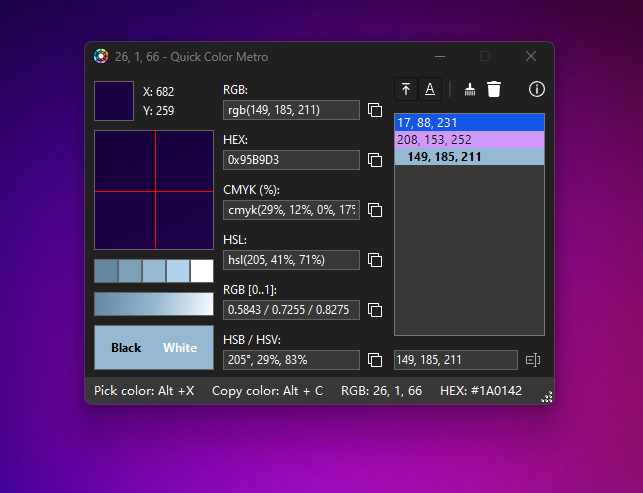
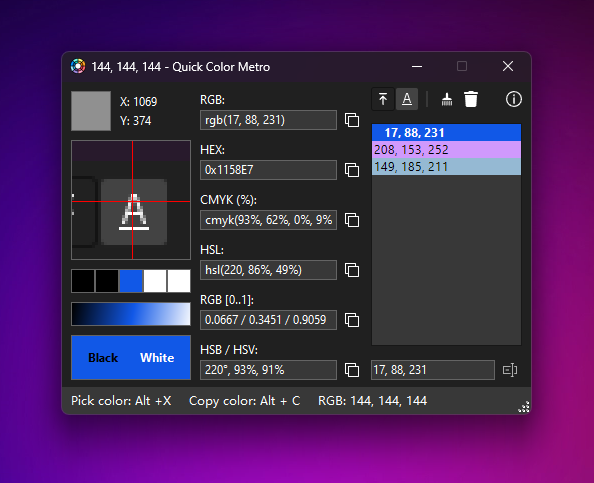
- Multiple Color Formats: Extracted colors are displayed in RGB, HEX, CMYK, HSL, and HSB formats. This versatility ensures compatibility across different design and development platforms, from web design tools to print production software.
- Color History List: A persistent history panel on the right side of the interface stores recently captured colors. This allows for quick recall and reuse, reducing repetitive extraction and improving efficiency in ongoing projects.
- User-Friendly Interface: The app features a clean, minimalist layout that prioritizes accessibility. Even users with limited experience in color manipulation can navigate the tool with ease, thanks to its straightforward visual hierarchy and logical placement of controls.
For example, a web designer working on a responsive layout can use the ALT+X shortcut to capture a shade from a live preview, instantly view its HEX value, and apply it to CSS. Similarly, a digital artist might use the history list to maintain a consistent palette across multiple sketches. These practical applications demonstrate how the app enhances productivity without requiring technical expertise.
Interface, UX & Performance
Color Picker Metro presents a streamlined interface with a focus on clarity and minimal distraction. The layout centers around a primary color display area, flanked by format indicators and a right-side history panel. Navigation is intuitive, relying on keyboard shortcuts and direct visual feedback to guide users through each step of the color extraction process.
The app’s visual style is functional and unobtrusive, using neutral tones and clear typography to emphasize content over decoration. This design choice supports prolonged use without visual fatigue, which is essential for professionals engaged in detailed work. Interaction is responsive, with immediate feedback upon color capture and format conversion.
Although the developer did not list formal performance metrics, the app’s lightweight footprint of 4.2 MB suggests efficient resource usage. It is expected to run smoothly on standard Windows systems, including older or low-end hardware. The application maintains stability during repeated use, with no reported issues related to crashes or lag. However, specific compatibility details for different Windows versions were not disclosed.
Platform Compatibility & Technical Requirements
Color Picker Metro is available exclusively for the Windows platform. It is compatible with Windows operating systems, though specific version requirements were not listed by the developer. The app has a file size of 4.2 MB, making it a lightweight download suitable for users with limited storage or slower internet connections.
Given its small size and targeted functionality, the app is likely optimized for low-resource environments. However, the developer did not specify minimum OS requirements, hardware specifications, or installation prerequisites. Users are advised to ensure their system meets general Windows compatibility standards before installation. The app is distributed as a free tool, with no in-app purchases or subscription models.
Pros and Cons
Pros
- Lightweight design with minimal system impact
- Quick color extraction via keyboard shortcut (ALT+X)
- Support for multiple color formats (RGB, HEX, CMYK, HSL, HSB)
- Intuitive interface suitable for beginners and experts alike
- Color history feature enhances workflow efficiency
- Free to download and use
Cons
- Platform limited to Windows only
- Developer did not provide detailed system requirements
- No cloud sync or cross-device access
- Interface lacks customization options
- No support for advanced color space conversions or profiles
FAQ
Is Color Picker Metro safe to download and install?
Yes, the app is free and distributed without known malware or security risks. It does not require administrative privileges for installation and operates within standard Windows security protocols.
Can I use Color Picker Metro on multiple devices?
The app is designed for Windows systems and does not support synchronization across devices. Each installation must be performed separately on individual machines.
Does Color Picker Metro support macOS or Linux?
No, the application is currently available only for Windows. There is no official support for macOS or Linux platforms.
How do I extract a color using the app?
Press the ALT+X keyboard shortcut while hovering over any color on your screen. The app will instantly capture the color and display it in multiple formats.
Is there a way to export or share captured colors?
The app does not include built-in export or sharing functions. However, users can manually copy color values from the interface and paste them into other applications.
Final Thoughts
Color Picker Metro stands out as a focused, efficient utility for anyone involved in digital design, development, or color-sensitive work. Its core strengths lie in speed, simplicity, and format versatility—key factors that directly impact productivity. The ability to extract colors with a single keyboard shortcut, combined with real-time format conversion and a persistent history list, makes it a practical addition to any creative workflow.
While it lacks advanced features like cloud integration or cross-platform support, its minimalist design ensures it remains fast and reliable. For Windows users seeking a no-frills, free tool to enhance color accuracy, Color Picker Metro delivers consistent value. Its small size and zero cost make it accessible to students, freelancers, and professionals alike.
Download Color Picker Metro now


